I am trying to create a question about solving systems of equation by elimination, but I want to be able to create a question that changes the values of the coefficients so that all my students get a different question to prevent cheating. I know I have to use the random generator, but I don’t know how to manipulate the random numbers so that I can check for correctness. Does anyone have any ideas? could you please guide me?Thank you!
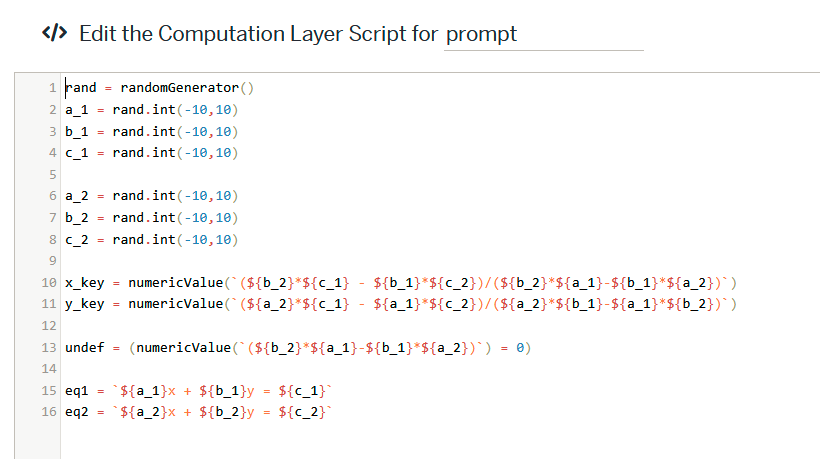
You can use the randomly generated variables to calculate the answers, and then use those answers to provide feedback when the students input their answers. I whipped up a quick activity that gives an example of this:
The “prompt” element gets the random numbers and calculates the expected answer (or determines if the answer is undefined)
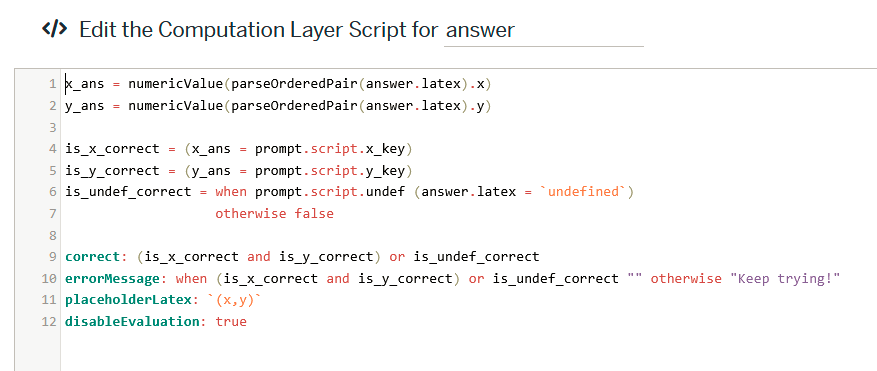
Then the math answer box has the logic for determining if the answer is correct (only lets them submit if the answer is correct, you might want a different result if they answer an incorrect answer).
Hope this helps!
Great explanation using the randomGenerator().
One suggestion if using that approach would be to use an absolute value difference within a tolerance instead of a comparison of values for correctness in answer lines 4 and 5.
For example:
x_key = prompt.script.x_key
is_x_correct = numericValue(`\abs(${x_ans}-${x_key})`) <= 0.01
I’d also recommend using formatLatex(), which would remove 0 terms and coefficients of 1, to simplify eq1 and eq2 for more expected forms of equations.
eq1 = formatLatex(`${a_1}x` + ${b_1}y = ${c_1})
Alternatively, if you want to limit all values to integers, you can get cleaner values, without need for an undefined check. For the equation ax+by=c you can simply define everything on the left side using the randomGenerator() and calculate c. With some tweaks you could potentially include some rational answers with a similar method, but that may get more complex than your solution.
Oooh, I was thinking about the tolerance but couldn’t think of a clean way to do it, that’s really nice!
I was also wondering if it’d be possible to keep all answers integers, and that’s a really nice way to do it. Thanks!
I have updated the activity linked above. The first page gives problems where x and y may not be integers, and the second only gives problems with integer solutions (or identical lines).
Thank you for sharing your ideas , I can’t wait to try them! I love learning and teaching but I always need more time. I really appreciate your help!
I have a quick follow up question. Does the rand.int change every time I move away from the screen then back, or does it change when I close the activity, then open it?
It will not change every time. Once it initializes it’s set, although anything in CL is individually randomized for each student (i.e. generally students will have unique values). randomGenerator() allows a seed argument, so you can use button presses or, say, correctness counts to reset values.
r = randomGenerator(button.pressCount)
value1 = r.int(-10,10)
value2 = r.int(-10,10)
This would generate a new set of values each time the button is pressed.
that is cool.
/////////////
Thank you for your help, I did it! I modified it a little bit, but I did not know how to deal with the case when they get equivalent equations.
My students were surprised when they saw that everyone got different questions! I really appreciate your help! Thank you!
You could probably run a third set of values to use instead of the second when the first two sets match. I’m pretty sure I’ve seen a more robust way, but I’d have to track down a method.