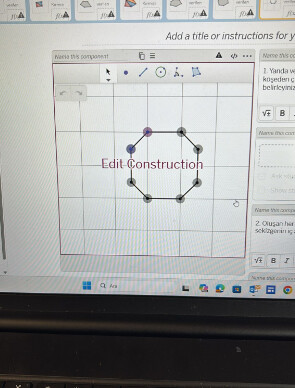
I want to draw a octagon and let students measure its interior angles. But the octagon I draw is not locked so the corners move as the students work on the octagon. I want to ask how to lock a shape so that the students measure without changing its shape? Thank you
Welcome to the forum!
What is the context in which you are working with the octagon? For example, are you working in a Desmos Graph, Desmos Geometry, Polypad, or is this a part of an Amplify Classroom Activity?
If you have screenshots or links to the activity, that will also be very helpful!
Would this work? Happy Valentines! | Desmos
Thank you a lot but I could not add this to the main desmos lesson slides 
Great, thanks! I don’t have experience with Desmos Geometry in their classroom activities, but I do know that in their geometry tool, when you click on one of the points, your top bar should show some options, like this:

If you click on the three dots, a dropdown menu appears that gives you the option to make the point not draggable (by unchecking the “draggable points” box)

If you do that for all points, I would expect it’ll prevent students from dragging points while doing the activity.
@Pinar_Akbay1 To add on, you can also Box Select instead of having to click each individually.

The details are slightly different. If you click the construction icon next to the “+”, you’ll see representations of your objects. You can drag the icons down into the expression list to see the same points you may be used to in the standard graph, or…

…using the Box Select, the menu gives an option to “Move to expression list:” by naming a folder.

This moves your objects into a folder, incrementally naming each object. You can then long-click the colored icon to the left to exercise the same control over point (and object) parameters you would in the standard graph (e.g. color, point size, draggability).

Separate from draggability, do you have a way you want students to measure the angles? When you click on a vertex of a polygon, all the measurements pop up simultaneously. Measuring individually would require turning off the polygon visibility, which leaves just the points, but there is a segments() function that will create a list of the polygon’s sides:

Students could then measure angles individually, but would need to sequentially select 3 points to define the angle they want to measure. I’m not sure how desirable that is either.
Thank you a lot for your help